Video/Image Face Swap Tutorial and Notes
Face Swap Tutorial
Multi-task Parallel Processing Instructions
Our site supports multi-task parallel processing. You can upload multiple videos or images for face swapping simultaneously, and the system will process them in parallel.
Video Face Swap Steps
- Upload Source Video File Go to the website (https://www.aihubgo.com/swapface) and click the upload button to select the video file you want to perform face swapping on. Supports common video formats such as MP4, AVI, MOV, with file size not exceeding 500MB.
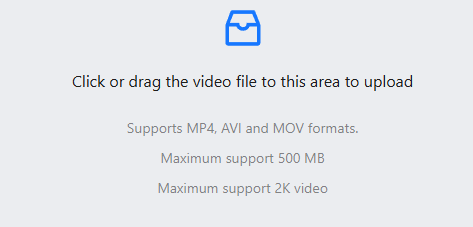
- Wait for System Processing The system will perform preliminary detection and processing on the uploaded video to generate a task to be executed.
- Upload Target Face Photo In the task interface, upload the target face photo you want to swap in. It is recommended to use a high-definition front-facing photo with clear facial features.
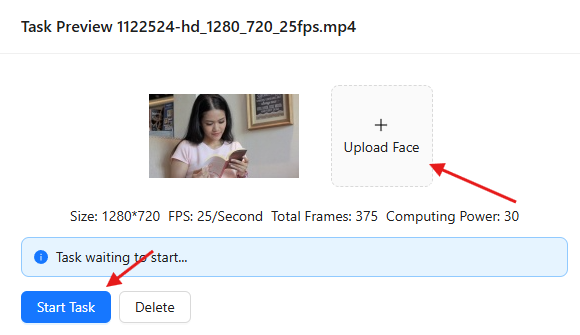
- Start Face Swap Task After confirming the uploaded files are correct, click the "Start Task" button to initiate the face swapping process.
- Download Result File After the system completes the computation (processing time depends on video length and resolution), click the download button to save the face-swapped video file.
Image Face Swap Steps
- Upload Source Image File Select the image file you want to perform face swapping on and upload it.
- Upload Target Face Photo Upload the target face photo you want to swap in.
- Start Face Swap Task After confirming the files are correct, click the "Start Task" button.
- Download Result File After processing is complete, download the face-swapped image.
Notes
Copyright Statement
Please ensure you have absolute legal copyright to the uploaded videos and face photos. Our website does not hold copyright to any uploaded or generated files, nor can we provide corresponding copyright. All disputes or potential legal responsibilities arising from this shall be borne by the uploader.
Privacy Protection
Files generated by users on this website are retained for a maximum of 48 hours. After 48 hours, the system will automatically delete them without keeping any backups. You can also manually delete these files.
Upload File Requirements
Single Person Video Face Swap Requirements
- The uploaded video should be a single person front-facing video (the face in the video should face the camera directly, with both eyes, nose, mouth, forehead, and chin exposed to achieve the best results)
- Other angles may cause flickering, out-of-focus issues, etc.
Target Face Photo Requirements
- Should be a high-definition front-facing photo without obstructions (both eyes, nose, mouth, forehead, and chin need to be exposed)
- Note that front-facing and slightly side-facing means a person's both eyes, nose, corners of the mouth, forehead, and chin are clearly visible and unobstructed, which will produce good face swap results
- Excessive movement may cause image blurring, so please try to use relatively static video frames
Computing Resource Consumption
According to our site regulations, every 25 frames count as 1 second, and less than 1 second is calculated as 1 second; video total duration less than 10 seconds is calculated as 10 seconds.
- Videos with resolution below 1280: 2 computing points per second
- Videos with resolution greater than 1280 and less than or equal to 1920: 4 computing points per second
- Videos with resolution exceeding 1920: 6 computing points per second
Content Compliance Requirements
Please upload content that complies with local laws and regulations. For illegal or non-compliant content, our site reserves the right to refuse processing or delete relevant content, and may ban accounts in serious cases.
Usage Recommendations
- To achieve the best results, please use original materials with sufficient lighting and clear picture quality
- Try to avoid using excessively compressed or low-quality video files
- Please be patient during the processing and do not submit the same task repeatedly
- If you encounter processing failures or other issues, please contact customer service for assistance